找回密码
 注册
查看: 485|回复: 7

K2 USB-C Meter Download Manuals Firmware PC software(12/25)

[复制链接]

31

主题

84

回帖

3179

积分

Administrator

积分
3179
发表于: 03-11-2025 06:59:29
| 显示全部楼层 |阅读模式
K2 USB-C Voltage and Current Meter User Manua
K2forum.png
PC22.png
US  https://www.amazon.com/dp/B0FZWGRLNT
DE  https://www.amazon.de/dp/B0FZWGRLNT
JP   https://www.amazon.co.jp/dp/B0FZWGRLNT

-------------- Firmware upgrade --------------
Press and hold the K2 “-”“DFU” button, the HID interface is connected to the computer to enter the firmware upgrade mode (the screen displays DFU mode, and the button can be released after the screen is displayed)

K2 Overview
  • RTOS real-time operating system + WIUI human-machine interface
  • 32-bit high-speed CPU
  • Independent 16-bit high-precision ADC sampling chip
  • Standalone electronic storage for data logging, retains data on power-off
  • High-speed sampling with fast refresh rate
  • 24P pass-through high-current, high-conductivity USB-C terminals

  • Do NOT connect HID power during PD measurement, as K2 requires multiple restarts for accurate detection.


K2 Features
  • PD3.1 support – 28V EPR and AVS protocol triggering
  • Supports detection and triggering of multiple fast-charging protocols
  • Unified 4D interface – WIOS + WIUI + PC
  • 240 MHz ultra-high-speed M4F 32-bit CPU with FPU hardware acceleration
  • Independent ADC sampling + on-chip 2 MHz high-speed AD
  • Spectrum analysis – simultaneously track charger ripple and frequency characteristics
  • Built-in capacity calculation
  • Built-in gravity sensor – supports automatic screen rotation


K2 Specifications
Voltage Measurement:
  • DC 3.3–48 V (K2-237)
  • DC 3.3–36 V (K2-226)
  • Voltage Resolution: 0.0001 V

Current Measurement:
  • Measurement Range: 6 A (10 A short-term peak)
  • Current Resolution: 0.0001 A (bidirectional)
  • 6 A for continuous operation
  • 10 A not recommended for more than 2 min

Capacity Recording:
  • 0–99999 Ah
  • 0–99999 Wh

CPU:
  • ARM M4F 240 MHz, 32-bit high-speed, with FPU hardware acceleration

Display:
  • 1.54-inch color IPS LCD, 240×240 resolution, wide viewing angle

Sensors:
  • 3-axis gravity sensor (for auto screen rotation)

Core ADC:
  • Independent 16-bit ADC chip (INA226: 36 V, INA237: 48 V)
  • On-chip high-speed ADC: 2 MHz
  • Low-resistance shunt resistor (high-side sampling) with anti-common-ground interference

Interfaces:
  • 24P USB-C male/female pass-through
  • External sensor: NTC temperature probe -20 °C to +120 °C (via special Type-C interface)

Storage & Firmware:
  • EEPROM with wear leveling
  • Firmware upgrade: USB HID (driver-free, via dedicated USB-C HID interface)
  • PC connection for curve plotting: HID software (USB-C HID, driver-free)

Identification:
  • VIP Code: unique serial number

High-Speed Waveform Sampling:
  • Up to 2 MHz
  • Ripple analysis: simultaneously display frequency data and ripple values

Dimensions:
  • Approx. 36.0 × 33.7 × 9.3 mm (excluding USB-C male connector)


NOTE:The software prompts that the runtime library is missing. Please install the .NET Core runtime first.
Runtime library download (win7, win10, win11 32/64 bit common) install x86, don't install 64


K2_Firmware_V4.9.zip

418.76 KB, 下载次数: 77

12-15-2025

NEW WITRN_PC_V1.0.4.zip

41.34 MB, 下载次数: 9

Latest version with curve plotting records (Only for Win)19-01-26

windowsdesktop-runtime-8.0.11-win-x86.exe

51.18 MB, 下载次数: 4

Please install the .net core runtime first

WITRN_USBMeterUP_V30.zip

1.64 MB, 下载次数: 7

USBMeterUP_V30 for K2 CC1 C5 C4 C4L

回复

使用道具 举报

31

主题

84

回帖

3179

积分

Administrator

积分
3179
 楼主| 发表于: 03-11-2025 07:03:40
| 显示全部楼层
The system is continuously updated.
Images and descriptions may differ from the actual product; the actual product shall prevail.


K2pressk4.png
Press “+” to activate the PD charger and turn on the screen.
“Warning: Do NOT power on by pressing the OK button (detection or fast-charging trigger may cause the screen to go black).”


K2 Button & PD Operation Guide
1. K2 Pass-Through Mode
  • Directly connecting a PD charger to the TYPE-C port will not light the screen.
  • Press the “+” button to activate PD and light the screen.

2. K2 Male Port → Charger
  • Press the lightning button to enable PD 5V output.

3. K2 Female Port → Charger via Original Cable
  • Press and hold the lightning button to activate PD 5V output.
  • If no response, flip the cable, reconnect, and long-press the lightning button again.

  • PD protocol detection and triggering (including MIPPS) only work when the lightning button lights the screen.

4. Notes & Tips
  • Some chargers require 10–15 seconds of power-off to restore output or fast-charging.
  • If unresponsive, long-press the lightning button multiple times to discharge the charger.
  • Pressing OK to light the screen disables PD measurement, because K2 has no battery or physical switch. PD requires the lightning button to activate the internal electronic switch.
  • Modified chargers (e.g., Xiaomi Type-A mods) may output 5V immediately. To verify PD: press and hold the lightning button before connecting the AC cable and check the protocol screen. Flip the cable if no PD data appears.
  • Always use the original PD/data cable with Emark when measuring or triggering protocols.


K2back.png
K2 Button Functions
  • BACK: Return / Exit
  • OK: Confirm / Execute / Save / Enter
  • +: Switch screen / Adjust / Increment
  • -: Switch screen / Adjust / Decrement


Tips – PD Observation for Modified Type-A Chargers
  • Some modified Type-A PD chargers (e.g., Xiaomi, VIVO) output 5 V immediately upon insertion, without PDO broadcast.
  • Inserting K2 will light the screen but show no PD information, making it impossible to determine CC orientation.
  • Solution: Press and hold the lightning button while inserting the modified AC cable. If PDO data appears, the orientation is correct.


DFU Firmware Upgrade Mode
  • Press and hold the “-” / DFU button while powering on to enter firmware upgrade mode.


Current Measurement Notes
  • If measuring current from the female port input → male port output, K2 will detect its own operating current.
  • USB meter devices typically draw tens of mA. To eliminate this effect, either:

    • Use male port input → female port output, or
    • Power K2 from the HID 5 V port.


回复

使用道具 举报

31

主题

84

回帖

3179

积分

Administrator

积分
3179
 楼主| 发表于: 03-11-2025 07:26:55
| 显示全部楼层
K2 Main Interface
P1: Large-font Current and Voltage Display Interface
p1forum.png

P2: Measurement Interface / Capacity Statistics Interface
P2forum.png

P3: High-Speed Ripple Waveform
P3forum.png

P4: Function Menu
p4forum.png

Note: The screen-off interface is disabled by default and can be enabled in the settings menu.
Press KEY+ / KEY- to switch screens forward/backward.

回复

使用道具 举报

31

主题

84

回帖

3179

积分

Administrator

积分
3179
 楼主| 发表于: 03-11-2025 07:33:04
| 显示全部楼层
P1 Main Interface
P1: Large-font display of Voltage, Current, and Power
P1-1.png
P1 Interface: Voltage, Current, Power, and Current Direction
  • Short press KEY+ / KEY- to switch screens forward/backward.


CC1: Currently triggered CC line of the USB meter.
  • For standard 5 V chargers without PD, CC will be displayed.
  • Many non-PD chargers may affect CC voltage and trigger CC1 or CC2 display—this is normal.


D+ / D-: Voltage on the two USB 2.0 communication lines, in volts (V).

Title Bar Icons:
  • Right arrow: Gravity sensor enabled (can be disabled in P4 menu to switch manually).
  • Computer icon: HID connection status.


Left Side: NTC – Display area for external temperature probe.
  • Free DIY temperature probe tutorial available at the end of this webpage.


Screen Controls:
  • Short press BACK to lock/unlock manual screen rotation.
  • In lock mode, long press BACK to manually change screen orientation.
  • Short press OK to pop up quick PDO list (non-PD chargers will not display info).
  • Long press OK to switch screen refresh rate: selectable 1, 2, 5, or 10 FPS.


Oversampling Algorithm: Leveraging the 16-bit independent ADC chip, K2 performs signal oversampling to effectively improve signal acquisition resolution.
However, due to the uncertainty of signal noise, the standard resolution for K2 series is 0.0001 V and 0.0001 A. Values beyond four decimal places are calculated using the oversampling algorithm and may not be accurate—for reference only.
-------------------------------------------------------------

K2 Special Feature: Quick PDO / Quick RDO Technical Demonstration
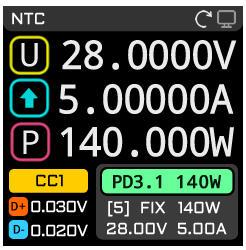
P1-2.png
1 Main Interface: Quick PDO / RDO Brief Info Box

PD3.1 140W:
  • PD3.1 indicates K2 has captured the real PD communication.
  • 140W is the maximum PD broadcast power provided by the charger.
  • Current K2 rule: regardless of SPR, EPR, PPS, or AVS, the maximum value among them is shown.


Second Line – FIX / PPS / AVS:
  • FIX: The phone is currently requesting the 5th PD profile for charging; fixed voltage level.
  • PPS: Continuously adjustable voltage within the SPR range.
  • AVS: Continuously adjustable voltage within the EPR range.
  • 140W: The actual power value currently requested by the phone.


Third Line – 28.00V 5.00A:
  • Shows the voltage and current requested by the phone for charging.
  • Note: The phone requesting this voltage/current profile does not guarantee charging at exactly this value.
  • Actual charging voltage/current is generally lower than the requested numbers.


K2 Version 2.0 and above introduces multi-protocol passive monitoring.
  • Supports listening to PD ID broadcasts from multiple well-known domestic and international charger brands.

-------------------------------------------------------------
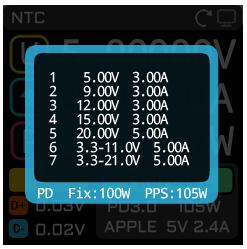
P1-3.png
Quick PDO:
When a PD-enabled charger or power bank is connected to K2,
pressing the OK button in this interface allows you to quickly view the PD charger’s broadcast information.
  • Quick PDO only displays the PD broadcast list and does not trigger high voltage.
  • Since it does not change the voltage, PD data can be read safely and quickly.

-------------------------------------------------------------
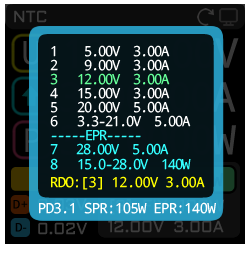

P1-4.png
Quick PDO / RDO Detailed List:
When a phone is charging via PD, the brief info box may not show complete information.
  • Press the OK button to display the detailed PD broadcast and charging request list.

Color Indicators:
  • Green: The phone has requested the 3rd PD profile from the charger.
  • Yellow (RDO): The phone’s currently requested voltage and current.

Notes:
  • The phone’s requested voltage/current may not match the PDO broadcast exactly.
  • The actual charging voltage/current may be higher, equal to, or lower than the requested values.

    • Example: The phone requests PPS 11 V 3 A, but actual charging could be 12 V 4 A. This is normal.

-------------------------------------------------------------

Quick-Charging Protocol Assisted Estimation: “Fake Protocol” Introduction
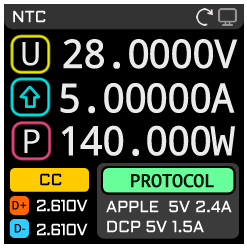
P1-5.png
Note: The fast-charging protocol shown as PROTOCOL is estimated based on the D+ and D– voltage levels and the charging voltage/current.
  • It does not represent the actual fast-charging communication protocol being used by the phone or charger.

-------------------------------------------------------------

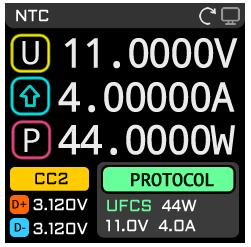
Fast-Charging Protocol Real-Time Capture: Integrates Quick-Charging UFCS and VIVO (VFC)
P1-6.png
K2 supports real-time capture of UFCS and VIVO (VFC) fast-charging protocols. It can decode charging data from both protocols in real time, displaying current voltage and current information.
  • UFCS: Green indicates data packets are being captured; red indicates communication has paused.
  • Note: After UFCS or VFC handshake, if the device stops communication but maintains the high-voltage profile, this is normal. This is commonly seen with power banks.

    • Example: A power bank requesting a fixed 11 V 4 A profile may stop communication, turning UFCS red.


Why does a 100 W charger show only 65 W on this interface when plugged directly into K2?
  • The main interface performs passive PD listening and does not actively trigger charger PD profiles.
  • Some protocol chips, if not triggered, will broadcast only low power.

    • Example: A 100 W (20 V 5 A) charger may only broadcast 65 W (20 V 3.25 A).

  • To measure the full 100 W, enter the PD trigger interface for active testing.
  • Currents above 3 A / 3.25 A generally require an Emark-equipped data cable. K2’s virtual Emark is not fully powered, so 5 A measurements require a proper Emark cable.


回复

使用道具 举报

31

主题

84

回帖

3179

积分

Administrator

积分
3179
 楼主| 发表于: 03-11-2025 07:34:02
| 显示全部楼层
P2 Capacity Statistics Interface
P2-1.png
P2 Interface: Capacity Statistics
Title Bar:
  • REC > 0.08 A: Data recording only starts when current exceeds this threshold. Most phones draw tens to over 100 mA of standby current after full charge, so a threshold is needed to accurately record capacity. Users can adjust this value by observing their phone’s standby current 30 minutes after full charge.
  • Right side “1”: Indicates data is being recorded in the first storage slot. Short press BACK to switch to the second slot.
  • Circular marker: Blinking indicates active recording.

Two Storage Slots:
  • Designed to allow users to record charging and discharging capacities separately, useful for calculating conversion efficiency.

Metrics:
  • Ah: Charging capacity
  • Wh: Charging energy
  • Left-side time: Duration of current offline recording for the selected slot

Controls:
  • Long press OK to clear capacity data.

Storage Notes:
  • K2 uses conventional EEPROM for offline capacity recording, not ultra-high-cycle ferroelectric storage like C5.
  • Most of K2’s independent storage is allocated for wear-leveling algorithms.
  • Remaining AVG and MAX values do not have enough redundant space for wear-leveling.
  • K2 provides a workaround: power-off memory for MAX and AVG data. Short press OK to record, with a lifespan of over 1 million cycles.


回复

使用道具 举报

31

主题

84

回帖

3179

积分

Administrator

积分
3179
 楼主| 发表于: 03-11-2025 07:34:53
| 显示全部楼层
P3 Ripple Detection
P3forum.png
P3: Ripple Detection Interface
  • 2 M: Sampling frequency
  • 100 kHz: Auto-tracked frequency value
  • K2 features single-frequency tracking technology.

The black triangle icon with an orange cursor below the ripple waveform indicates auto-frequency lock.
  • K2 can automatically track, lock, and calculate the waveform with the strongest spectral intensity and display its operating frequency.

Curves:
  • Curve 1 (white): Actual ripple waveform
  • Curve 2 (blue): Spectrum analysis

Ripple Curve: Reflects the amplitude of charger ripple (smaller is better).
Spectrum Curve: Reflects the frequency characteristics of the charger’s entire topology.
  • From the spectrum curve, you can observe the charger’s switching frequency distribution:
    • Standard low-power QR flyback chargers: tens of kHz
    • High-frequency GaN chargers (e.g., AHB): over 100 kHz

  • For chargers with secondary buck output: multiple strong peaks may appear in the spectrum.

Vpp: Current measured ripple value
  • Typical chargers can maintain ripple below 200 mV.

Ripple Measurement Method:
  • K2 must be placed close to the charger, directly connected.
  • Use a data cable over 1 m to connect K2 to the trigger/load.
  • Must use a professional commercial load for testing.
  • Ripple data is typically measured at 20%, 50%, and 100% load.

Note: Using a phone or power bank as the load, or testing no-load, does not measure actual ripple.
Controls:
  • Short press OK to switch sampling rates: 500 kHz, 1 MHz, 2 MHz.
  • For standard chargers, 2 MHz sampling rate is recommended.


回复

使用道具 举报

31

主题

84

回帖

3179

积分

Administrator

积分
3179
 楼主| 发表于: 03-11-2025 07:36:08
| 显示全部楼层
P4 Tools menu.
p4forum.png

回复

使用道具 举报

31

主题

84

回帖

3179

积分

Administrator

积分
3179
 楼主| 发表于: 03-11-2025 08:13:10
| 显示全部楼层
K2 Firmware Upgrade Method

Connect the HID port to a computer using a USB-C data cable.

K2up.png

First, press and hold the "DFU / -" button, then connect the USB-C port to the HID communication port.

When the DFU prompt appears on the screen, release the "DFU / -" button.


-------------------------------------------------------------


DIY Type-C external temperature probe
1. Connect the TYPE-C connector’s GND to either SBU1 or SBU2.
2. The NTC sensor wires are not polarity-sensitive.
ntc.png
NTC specification: 10kΩ (±2%) @25°C, B=3435


回复

使用道具 举报

您需要登录后才可以回帖 登录 | 注册

本版积分规则

Archive|手机版|小黑屋|AVHzY Forum

GMT-8, 29-01-2026 05:20 , Processed in 0.144514 sec., 20 queries .

Powered by Discuz! X3.5

© 2001-2026, Tencent Cloud.

快速回复 返回顶部 返回列表
